

Timplapse con registrazione circolare
I progetti timelapse basati su schede Raspberry Pi sono numerosi, ben documentati e replicabili. Perchè quindi creare l’ennesimo progetto camera timelapse?
La mia esigenza è quella di creare un sistema che scatta delle fotografia ad intervalli regolari, ma con la possibilità di registrarle in modo circolare. Cosa significa registrazione circolare?
Il classico timelapse esegue un numero continuo di scatti. Il timelapse circolare invece, dopo aver raggiunto un numero massimo di scatti continua la sequenza di registrazione sovrascrivendo le foto meno recenti.
Questo sistema ha il vantaggio di non andare mai a saturare la memoria e quindi si adatta in tutte quelle situazioni in cui non possiamo andare spesso a scaricare le fotografie.
Infatti questo sistema è utile quando viene installato in zone remote e quando non abbiamo la certezza di andare a scaricare le foro in maniera regolare avendo la certezza che la registrazione saturerà la memoria del Raspberry.
Nel dispositivo che ho realizzato ho inserito anche una serie di pulsanti in modo da avere un sistema gestire il software senza usare l’interfaccia grafica.
Lo scarico dei dati avviene utilizzando dei pulsanti che permettono di stoppare il timelapse, trasferire i files sulla pen drive e riprendere il ciclo di funzionamento.
Nella figura seguente è possibile osservare lo schema elettrico.
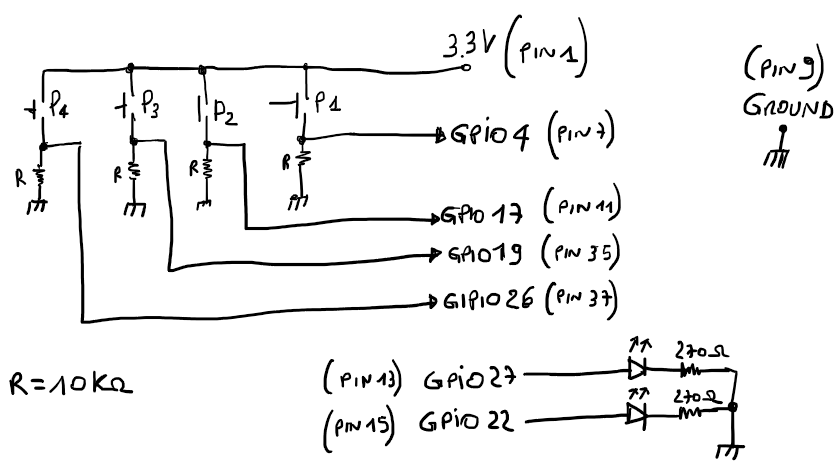
I quattro ingressi del Raspberry sono normalmente bassi (resistenze da 10k collegate a massa), premendo un pulsante porteremmo la 3.3Vdc sul pin di ingresso. I due led invece servono per avere delle indicazioni luminose sull’operazione che il software sta eseguendo.

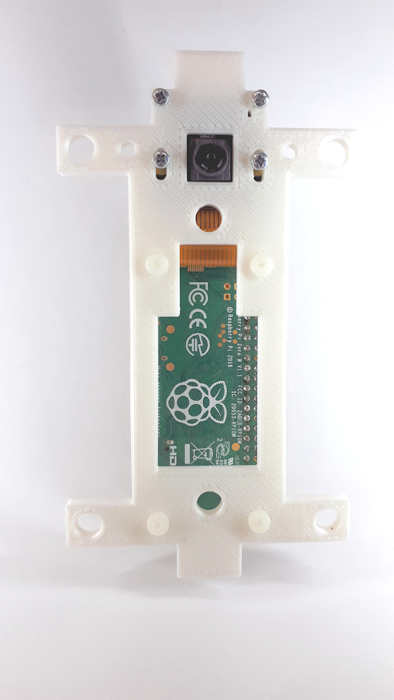
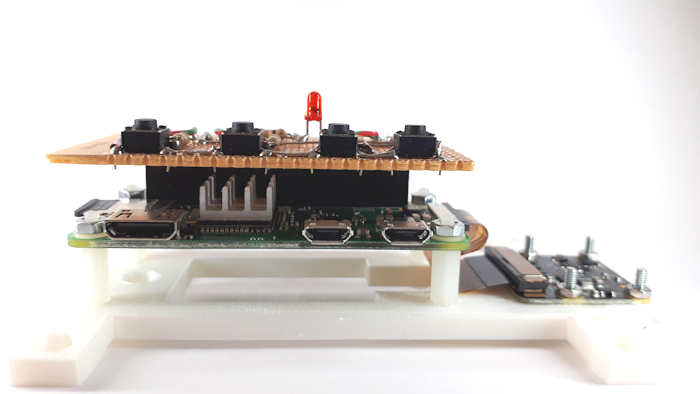


Il codice scritto in Python permette di acquisisce e memorizzare le foto, gestisce i pulsanti i led e scaricare le foto sulla pen drive.
from picamera import PiCamera
from os import system
import shutil
import time
import RPi.GPIO as GPIO
import os.path
import os

src_folder = "/home/pi/PythonProject/tl_pics/"
dest_folder = "/media/pi/logicapro/foto"

StartTL = True
AutoStart = True

i = 0
loop = False
newloop = False

GPIO.setmode(GPIO.BCM)
GPIO.setwarnings(False)

GPIO.setup(19, GPIO.IN)
GPIO.setup(26, GPIO.IN)
GPIO.setup(4, GPIO.IN)
GPIO.setup(17, GPIO.IN)

GPIO.setup(27, GPIO.OUT)
GPIO.setup(22, GPIO.OUT)

#led rosso on giallo off
GPIO.output(27, GPIO.HIGH)
GPIO.output(22, GPIO.LOW)

camera = PiCamera()
camera.resolution= (1024,768)

pics_id = open('/home/pi/PythonProject/PicsIndex.dat')
i = int(pics_id.read())
pics_id.close()

if (i>0):
    loop=True

def StopTL(channel):
    global StartTL
    global AutoStart

    print("STOP TL")

    if StartTL == True:
        StartTL = False
        AutoStart = False
        print ("StartTL =", StartTL)
        print ("AutoStart =", AutoStart)
        GPIO.output(27, GPIO.HIGH)
        time.sleep(1)


def RunTL(channel):
    global StartTL
    global AutoStart

    print("START TL")

    if StartTL == False:
        StartTL = True
        AutoStart = True
        print ("StartTL =", StartTL)
        print ("AutoStart =", AutoStart)
        pics_id = open('/home/pi/PythonProject/PicsIndex.dat')
        i = int(pics_id.read())
        print ("RunTL i =", i)
        pics_id.close()
        GPIO.output(27, GPIO.LOW)
        GPIO.output(22, GPIO.LOW)
        time.sleep(1)

GPIO.add_event_detect(17, GPIO.RISING, callback=StopTL, bouncetime=500)
GPIO.add_event_detect(4, GPIO.RISING, callback=RunTL, bouncetime=500)

while True:

    #primo pulsante
    if AutoStart == True:
        #start timelapse
        while (StartTL):
            i += 1
            #print (i)
            if loop==True:
                #print ("i=", i)

                try:
                    t = time.localtime()
                    anno = str(t[0])
                    mese = str(t[1])
                    giorno = str(t[3])
                    #print(giorno + "-" + mese + "-" + anno)
                    #se esiste il file lo cancello
                    if (os.path.isfile('/home/pi/PythonProject/tl_pics/image{0:05d}.jpg'.format(i)) == True):
                        print("elimino file esistente ".format(i))
                        os.remove('/home/pi/PythonProject/tl_pics/image{0:05d}.jpg'.format(i))

                    print("Eseguo shot " + str(i))
                    camera.capture('/home/pi/PythonProject/tl_pics/image{0:05d}.jpg'.format(i))
                    time.sleep(0.7)
                    GPIO.output(27, GPIO.HIGH)
                    time.sleep(0.3)
                    GPIO.output(27, GPIO.LOW)
                    #time.sleep(60)
                    pics_id = open('/home/pi/PythonProject/PicsIndex.dat', 'w')
                    pics_id.write(str(i))
                    pics_id.close()
                    print("pic_shot = " + str(i))
                except (e):
                    print("Errore shot " + str(i))
                    f = open('/home/pi/PythonProject/Error.txt', 'a')
                    f.write("Errore shot file " + str(e) + " ")
                    f.write(str(i) + "\n")
                    f.close()
                except:
                    print("Errore generico shot " + str(i))
                    f = open('/home/pi/PythonProject/Error.txt', 'a')
                    f.write("Errore shot file " + str(i) + " \n")
                    f.close()

                fc = open('/home/pi/PythonProject/CopyLog.txt', 'a')
                fc.write("Current shot ")
                fc.write(str(i) + "\n")
                fc.close()

                #attendi 2 minuti 60x2sec
                for tempo in range (60): #range(60):
                    GPIO.output(22, GPIO.HIGH)
                    time.sleep(0.1)
                    GPIO.output(22, GPIO.LOW)
                    time.sleep(1.9)

                    if StartTL == False:
                        break

            #10080 5040
            if i >= 4320:
                i=0
                loop=True
                print("NEW LOOP")
                time.sleep(1)

            if GPIO.input(17):
                break

        print ("Exit loop")

    #terzo pulsante
    if GPIO.input(19):
        #crea un video dai file del timelapse
        print("Terzo Pulsante")
        GPIO.output(22, GPIO.HIGH)
        time.sleep(0.5)
        GPIO.output(22, GPIO.LOW)
        time.sleep(0.5)
        GPIO.output(22, GPIO.HIGH)
        time.sleep(0.5)
        GPIO.output(22, GPIO.LOW)
        time.sleep(0.5)
        GPIO.output(22, GPIO.HIGH)
        time.sleep(0.5)
        GPIO.output(22, GPIO.LOW)
        time.sleep(0.5)
        os.system("sudo reboot")

    #quarto pulsante
    #copia le foto nella cartella della pen drive
    if GPIO.input(26):
        GPIO.output(27, GPIO.HIGH)
        GPIO.output(22, GPIO.HIGH)
        time.sleep(1)
        try:
            print("Copia file in corso")
            time.sleep(1)

            src = os.listdir(src_folder)

            for files in src:
                GPIO.output(22, GPIO.HIGH)
                time.sleep(0.1)

                if (files.endswith(".jpg")):
                    shutil.copy("/home/pi/PythonProject/tl_pics/" + files, dest_folder + "/" + files)
                    print(files)

                GPIO.output(22, GPIO.LOW)
                time.sleep(0.1)

            #fine copia files
            GPIO.output(27, GPIO.LOW)
            GPIO.output(22, GPIO.LOW)

            os.system("sudo umount /media/pi/logicapro")
            time.sleep(3)

            print("Copia file terminata")
            AutoStart=True
            StartTL = True

        except (IndexError):
            print("Errore copia file")
            AutoStart=False
            GPIO.output(22, GPIO.HIGH)
            GPIO.output(27, GPIO.HIGH)
            time.sleep(3)
            GPIO.output(22, GPIO.LOW)
            GPIO.output(27, GPIO.LOW)
            f = open('/home/pi/PythonProject/Error.txt', 'a')
            f.write("Errore copia file ")
            f.write(str(files) + "\n")
            f.close()
        except  (Exception, e):
            print("Errore generico")
            f = open('/home/pi/PythonProject/Error.txt', 'a')
            f.write("Errore generico " + str(e))
            f.write(str(files) + "\n")
            f.close()
            AutoStart=True
            StartTL = True


GPIO.cleanup()
I commenti nel codice illustrano come lavorano le istruzione Python.
Per la realizzazione ho scelto di utilizzare una Raspberry Pi ZERO, principalmente per il basso costo e le dimensioni contenute. La Pi camera può essere sostituita con la versione ir.
Per quanto riguarda l’alimentazione della scheda in zone remote è necessario un pannello solare, un regolatore di carica e una batteria dimensionati opportunamente per fornire la corrente per alimentare la Pi Zero e la Pi Camera.